Curriculum
Grade XII Employability Skills Level-IV
Lessons
0/5

Notes
0/5

Worksheets
0/5
Text lesson
Unit 3-ICT-Skills
Level IV · Class 12 · CBSE
Unit 3: Information & Communication Technology (ICT) Skills
Employability Skills · School Revise

1. Getting started with spreadsheets
A spreadsheet organises data in rows and columns of cells. Each cell has an address (e.g. B2).
You can enter text and numbers, and use formulas (e.g. =SUM(B2:B4)) to calculate automatically. The formula bar shows a cell’s formula.
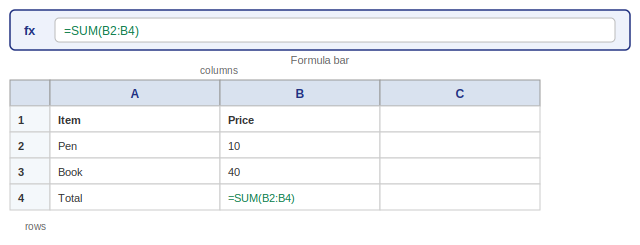
Figure: A spreadsheet – rows, columns, cells and formula bar
Practice (Multiple Choice)
- 1. Data in a spreadsheet is organised in rows and?
- circles
- columns
- lines
- boxes
- 2. A cell address looks like?
- 2B
- B2
- BB
- 22
- 3. =SUM(B2:B4) is a?
- title
- formula
- font
- folder
- 4. The bar that shows a cell’s formula is the?
- title bar
- formula bar
- task bar
- menu bar
- 5. Spreadsheets can calculate?
- never
- automatically
- by hand only
- slowly
Answers: 1-b, 2-b, 3-b, 4-b, 5-b
School Revise · schoolrevise.com · Employability Skills Class 12 · Unit 3
 Google